Install & Run in Seconds
Pick your system, copy, paste. Verifies the SHA256 checksum before unpacking anything.
curl -fsSLO https://github.com/ckir/aiprofiles/releases/latest/download/agent-profile-x86_64-unknown-linux-gnu.tar.gz \
 && curl -fsSL  https://github.com/ckir/aiprofiles/releases/latest/download/agent-profile-x86_64-unknown-linux-gnu.tar.gz.sha256 | sha256sum -c - \
 && tar -xzf agent-profile-x86_64-unknown-linux-gnu.tar.gz \
 && ./agent-profile agents
curl -fsSLO https://github.com/ckir/aiprofiles/releases/latest/download/agent-profile-aarch64-unknown-linux-gnu.tar.gz \
 && curl -fsSL  https://github.com/ckir/aiprofiles/releases/latest/download/agent-profile-aarch64-unknown-linux-gnu.tar.gz.sha256 | sha256sum -c - \
 && tar -xzf agent-profile-aarch64-unknown-linux-gnu.tar.gz \
 && ./agent-profile agents
curl -fsSLO https://github.com/ckir/aiprofiles/releases/latest/download/agent-profile-aarch64-apple-darwin.tar.gz \
 && curl -fsSL  https://github.com/ckir/aiprofiles/releases/latest/download/agent-profile-aarch64-apple-darwin.tar.gz.sha256 | shasum -a 256 -c - \
 && tar -xzf agent-profile-aarch64-apple-darwin.tar.gz \
 && ./agent-profile agents
curl -fsSLO https://github.com/ckir/aiprofiles/releases/latest/download/agent-profile-x86_64-apple-darwin.tar.gz \
 && curl -fsSL  https://github.com/ckir/aiprofiles/releases/latest/download/agent-profile-x86_64-apple-darwin.tar.gz.sha256 | shasum -a 256 -c - \
 && tar -xzf agent-profile-x86_64-apple-darwin.tar.gz \
 && ./agent-profile agents
& {
  $ErrorActionPreference = 'Stop'; $ProgressPreference = 'SilentlyContinue'
  $u = 'https://github.com/ckir/aiprofiles/releases/latest/download/agent-profile-x86_64-pc-windows-msvc.zip'
  Invoke-WebRequest -UseBasicParsing $u -OutFile agent-profile-x86_64-pc-windows-msvc.zip
  Invoke-WebRequest -UseBasicParsing "$u.sha256" -OutFile agent-profile-x86_64-pc-windows-msvc.zip.sha256
  $expected = ((Get-Content .\agent-profile-x86_64-pc-windows-msvc.zip.sha256 -Raw) -split '\s+')[0]
  $hash = (Get-FileHash .\agent-profile-x86_64-pc-windows-msvc.zip -Algorithm SHA256).Hash
  if ($hash -and $expected -and ($hash -ieq $expected)) {
    Expand-Archive .\agent-profile-x86_64-pc-windows-msvc.zip -DestinationPath . -Force
    .\agent-profile.exe agents
  } else { throw "checksum mismatch: expected $expected got $hash" }
}
Downloads one archive from the GitHub release, checks its SHA256, unpacks one file into this folder and runs it. The archive and the binary stay in this folder until you delete them or keep the binary (below). Nothing is installed anywhere else. Nothing leaves your machine.
agent:        claude
executable:   /home/probe/.local/bin/claude (PATH)
mechanism:    environment variable CLAUDE_CONFIG_DIR
support:      proven
version:      2.1.319 (verified 2026-11-09)
isolation:    config: supported
                cited: user settings live in the config directory; project .claude/settings*.json and .mcp.json still layer on top
              credentials: conditional
                measured: credential environment variables override it; the per-directory .credentials.json and macOS Keychain entry are cited, not measured
              state: not guaranteed
                cited: history and project state moving with the directory is community-sourced only

agent:        codex
executable:   /home/probe/.local/bin/codex (PATH)
mechanism:    environment variable CODEX_HOME
support:      proven
version:      0.167.0 (verified 2026-11-09)
isolation:    config: supported
                cited: config.toml and <name>.config.toml live in CODEX_HOME; project-level configuration layering is not measured
              credentials: conditional
                measured: OPENAI_API_KEY, CODEX_API_KEY and CODEX_ACCESS_TOKEN bypass it; that auth.json and the keyring key follow CODEX_HOME is cited, not measured
              state: conditional
                cited: CODEX_SQLITE_HOME relocates the state database; the variable is present in the binary but the probe sets only CODEX_HOME, so the relocation is not measured

agent:        aider
executable:   /home/probe/.local/bin/aider (PATH)
mechanism:    argument --config <file>
support:      proven
version:      0.86.2 (verified 2026-09-15)
isolation:    config: not guaranteed
                measured: the user-level ~/.aider.conf.yml, repository and cwd config files, .env files and AIDER_* variables still apply
              credentials: not supported
                measured: API keys come from the environment, .env files and config files
              state: not supported
                measured: history files are written in the working directory
… and 9 more
Captured in the project's sandbox from agent-profile 0.1.1 on 2026-11-04
Why Agent Profile?
Zero-Trust Isolation
Never copies credentials, extracts tokens, or sends telemetry. Keeps personal configurations, client secrets, and memory graphs strictly quarantined across repository boundaries.
Mathematical Precedence
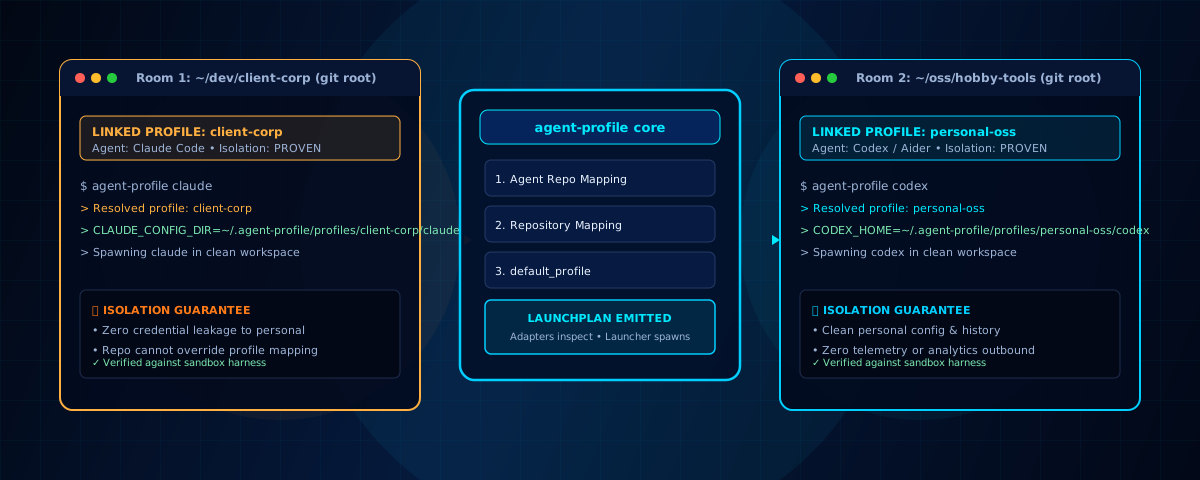
A rigorous 4-step precedence ladder: agent repo mapping → repository mapping → default_profile → error. Symlinks, worktrees, and submodules resolve to their canonical roots.
Evidence-Measured Claims
Twelve coding agents measured in an automated sandbox probe harness. Distinguishes between measured filesystem observations, vendor claims, and unmeasured assumptions.
Architecture: The LaunchPlan Contract
Agent Profile owns profile selection. The coding agent owns authentication and agent-specific configuration. The evidence determines what Agent Profile is allowed to claim.
Adapters Produce Data, Never Processes
Adapters inspect configuration paths and emit an immutable LaunchPlan. The centralized process launcher executes the target binary with a sterile environment, preventing ambient environment variable bleed and credential contamination.
Twelve Evidence-Measured Adapters
Every adapter is backed by an automated evidence harness measuring configuration relocation, credential leakage, and runtime state preservation:
Claude Code
Isolates via CLAUDE_CONFIG_DIR. User settings and keys follow the configured directory.
OpenAI Codex
Isolates via CODEX_HOME. Relocates config.toml and authorization state.
Aider
Isolates via --config <file>. Explicit flag injection avoids global configuration collisions.
Gemini CLI
Isolates via GEMINI_CLI_HOME. Relocates project settings, history, and tmp state.
Keep it
The snippet leaves the binary in the folder you ran it in. To keep it, move it to a folder on your PATH.
Linux and macOS
mkdir -p ~/.local/bin && mv agent-profile ~/.local/bin/
If agent-profile is then not found, add that folder to your PATH. In zsh, the macOS default: echo 'export PATH="$HOME/.local/bin:$PATH"' >> ~/.zshrc, then open a new terminal.
Windows
New-Item -ItemType Directory -Force $HOME\bin | Out-Null; Move-Item -Force .\agent-profile.exe $HOME\bin\
Windows does not look in that folder yet. Add it once: [Environment]::SetEnvironmentVariable('Path', [Environment]::GetEnvironmentVariable('Path', 'User') + ";$HOME\bin", 'User'), then open a new terminal.
The release binaries are not code-signed, so macOS may refuse to open the downloaded file and Windows may ask before running it. If that happens, xattr -d com.apple.quarantine agent-profile on macOS or Unblock-File .\agent-profile.exe on Windows clears the mark.
Rust users
cargo install --locked --git https://github.com/ckir/aiprofiles --bin agent-profile agent-profile
Needs Rust 1.98.
Downloads
The five archives of the latest release, each with its checksum.
What it never does
- Never copies credentials. README
- Never extracts tokens. README
- Never sends telemetry. README
- Never lets the repository choose a profile. README
What each agent keeps apart, and what it does not, is measured per agent: Supported agents matrix.
Officially supported by Clavity, and complete on its own.
Clavity is the multi-agent pairing environment connecting Claude Code with Google Antigravity, and it officially integrates Agent Profile for strict repository isolation. Agent Profile needs nothing from Clavity: install it as above and it works independently on any workstation.
Documentation & Specifications
Access our technical manuals, formal specifications, and developer guides:
- Full Documentation Portal — Complete CLI manual, config formats, and runbooks.
- How It Works — The 6-stage pipeline and resolution ladder.
- Supported Agents Matrix — Comprehensive 12-agent evidence report.
- Implementation Specification V3 — The authoritative design specification.
- Rustdoc API Documentation — Internal crate architecture and trait contracts.